Awesome Traffic Bot vs CTRTool: Bounce Rates
High bounce rates can quietly erase the value of your paid traffic campaigns. You need visitors who stay, click the right links, and behave like real prospects, not bots that exit in seconds. That difference decides whether your search visibility work compounds or collapses.
This comparison shows exactly how Awesome Traffic Bot and CTRTool handle visit quality and bounce rate control. You will see features, targeting, proof and pricing side by side, then get a clear verdict on which tool fits your campaigns.
Quick Verdict: Awesome Traffic Bot vs CTRTool for Bounce Rates
If bounce rate is your primary metric, CTRTool wins for campaigns that require verifiable, engagement-focused visits, while Awesome Traffic Bot is better suited for raw volume testing at a lower cost. The deciding factor is not how much traffic each tool can send, but whether that traffic behaves like a real visitor and whether you can prove it afterward.
Bounce rate punishes sessions that end on the first page. A visit that lands and leaves within seconds counts as a single-page session, which pushes your bounce rate up in Google Analytics and similar platforms. Volume alone does not fix that. The traffic has to stay, click, and move deeper into the site.
CTRTool is built around that behavior. Awesome Traffic Bot is a general automation tool, so engagement metrics depend heavily on how you configure it yourself. The table below summarizes the difference in plain terms.
| Aspect | CTRTool | Awesome Traffic Bot |
|---|---|---|
| Proof of visits | Screenshot proof for every visit, with search and landing screenshots as separate images | General automation tool, no built-in proof described |
| Visit depth | Full visit paths, up to 5 minutes with up to 5 additional internal pages | Engagement behavior depends on manual setup |
| Focus | Engagement-focused campaigns aimed at metrics like bounce rate and session duration | Broader automation features, raw volume testing |
CTRTool's campaigns are designed to mimic real user behavior. You can set configurable dwell time and multi-page visits, so a session looks like a reader who landed, stayed, and explored rather than a hit-and-run page view. That directly affects bounce rate and page views per session.
The proof layer matters just as much. Every visit comes with screenshot proof, and full visit paths show where each session went. If a client or stakeholder questions your website analytics, you have evidence rather than a traffic counter.
Awesome Traffic Bot takes a different approach. It offers broader automation features, which can be useful for raw volume testing and general scripting needs. For engagement metrics, however, it requires more manual setup. Dwell time, page depth, and behavior patterns are left to you to build and tune.
That gap is the heart of the verdict. CTRTool treats engagement metrics as the product. Awesome Traffic Bot treats them as a configuration exercise. For anyone whose goal is a healthier bounce rate, the first approach removes guesswork.
One fair trade-off: CTRTool is a specialized click-through rate tool, not a general-purpose automation suite. If your needs extend beyond search and landing visits, a broader tool may cover more ground. For bounce-rate work specifically, specialization is the advantage.
At a glance: how CTRTool compares to Awesome Traffic Bot on the features that matter most.
| Feature | CTRTool | Awesome Traffic Bot |
|---|---|---|
| Pricing | $59/mo (Starter) | From $24.90/mo |
| Free plan / trial | ✗ | 1-day trial |
| AI-powered campaign automation | ✗ | ✓ |
| Residential / rotating IPs | — | ✓ |
| Captcha solving | — | ✓ |
| Visual workflow editor | ✗ | ✓ |
| Screenshot proof per visit | ✓ | — |
| Search & social traffic | Search only | ✓ |
What Is CTRTool?
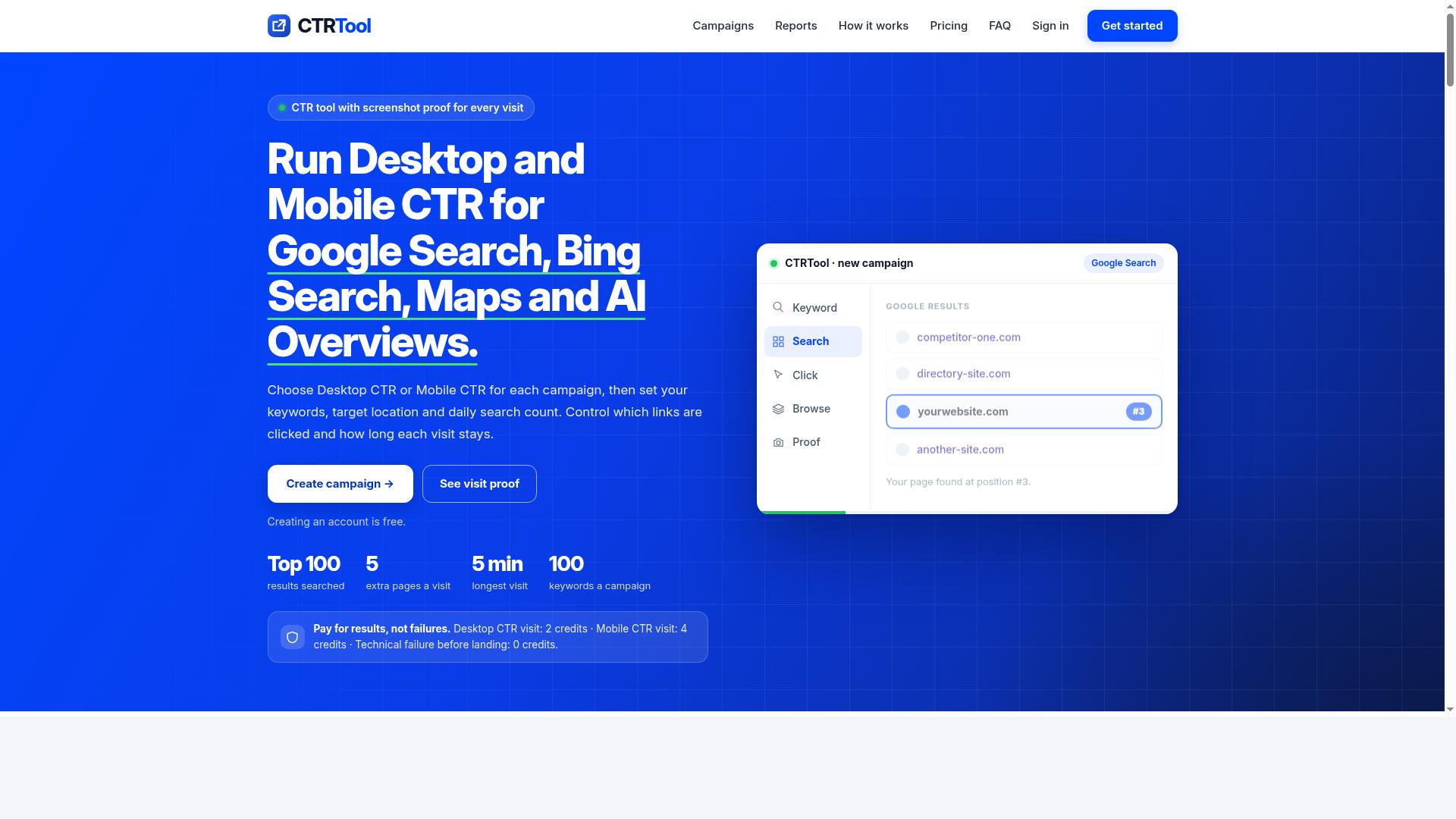
CTRTool is a SaaS platform that runs desktop and mobile CTR campaigns for Google Search, Bing Search, Maps, and AI Overviews, with screenshot proof for every visit. It is built as a specialized click-through rate tool, not a general-purpose traffic generator, and that focus shapes how its visits behave.
Each campaign starts with a simple choice: Desktop CTR or Mobile CTR. From there, users set keywords, target a location, define a daily search count, and control which links are clicked and how long each visit stays. Every one of those settings feeds directly into the engagement metrics that website analytics platforms record.
The platform covers the search surfaces that matter most for organic visibility:
- Google Search
- Bing Search
- Google Maps
- AI Overviews
Access runs on a credit-based system. The Starter plan, for example, is priced at $59 per month for 2,000 credits, with full plan details covered later in this article.
Two design choices stand out for anyone comparing it to Awesome Traffic Bot. First, every visit comes with screenshot proof, so campaigns are verifiable rather than assumed. Second, dwell time is configurable per visit, which lets users aim for longer session duration instead of instant bounces.
That configurability matters because bounce rate is calculated from single-page visits with little or no interaction. A tool that cannot control how long a visit lasts leaves that metric to chance. CTRTool puts the timing decision in the campaign setup itself.
The brand is also direct about limits. Its site states plainly that automated visits do not guarantee rankings. That transparency fits the product's overall emphasis on trackable, verifiable engagement rather than inflated promises, and it gives readers a realistic baseline for judging bounce rate results from either tool.
What Is Awesome Traffic Bot?
Awesome Traffic Bot is a desktop automation tool that simulates website visits using proxy rotation, user-agent spoofing, and headless browser technology to generate artificial traffic. It is generally described as traffic bot software that automates page visits, and it is often used either to test website analytics setups or to inflate page views.
In practice, the tool is built around a few common building blocks. These features make it flexible for general automation, but they also shape how it affects bounce rate and other engagement metrics.
- Proxy rotation to spread visits across many IP addresses
- User-agent randomization so each session appears to come from a different browser or device
- Headless browser rendering that loads pages without a visible window
- Automation scripts that can be configured for repetitive tasks, including web scraping
Because it is a general-purpose automation platform, Awesome Traffic Bot is not a dedicated CTR campaign tool. It does not ship with built-in proof mechanisms that document what happened during a visit, which makes it harder to assess the true impact on bounce rate or to verify that sessions behaved as intended.
That gap matters for anyone studying website analytics. Without a record of dwell time, scroll depth, or click tracking, it is difficult to separate real engagement from artificial traffic when reviewing session duration and single-page visits in Google Analytics.
It is also worth noting that simulated visits of this kind face growing bot detection systems. Proxy rotation and user-agent spoofing can help a visit look ordinary on the surface, but they do not guarantee that analytics platforms or security tools will treat the session as a genuine one.
The net takeaway is that Awesome Traffic Bot is best understood as a broad automation utility. It can generate page views, yet it offers little in the way of verifiable engagement data, so judging its effect on bounce rate and traffic quality requires outside measurement.
Features Compared
This comparison focuses on three areas that directly influence bounce rate: visit quality and bounce rate control, proof and transparency, and campaign types and targeting.
Bounce rate reflects whether a visit looks engaged or exits immediately. How visits are executed matters, from dwell time to multi-page navigation, and so does whether those visits can be verified afterward.
Targeting comes next. A visit from the wrong location or the wrong search context can distort website analytics instead of improving them. The subsections below examine each area in turn.
Visit Quality and Bounce Rate Control
CTRTool lets users configure campaign settings to influence bounce rate by controlling visit behavior, while Awesome Traffic Bot offers broader automation but less built-in control over engagement metrics.
Inside a CTRTool campaign, users set a click order and scrolling time, then add internal page URLs and link text. Visits can last up to five minutes in total, with up to five additional pages per visit. A simple example: set a 2-minute dwell time and route the visit through two internal pages so the session reads as multi-page rather than a single-page visit.
That structure directly counters the signals that inflate bounce rate. Longer session duration, extra page views per session, and scroll depth all feed into user behavior tracking in tools like Google Analytics.
Awesome Traffic Bot sits in the general traffic bot software category. It can be scripted to perform actions such as scrolling or clicking, but consistent bounce rate improvement depends on manual scripting. There is no native proof layer to confirm what a scripted session actually did.
In short, CTRTool treats engagement as a campaign setting. The competitor treats it as a scripting project.
Proof, Tracking and Campaign Transparency
CTRTool provides screenshot proof for every visit and tracks keyword positions over time, including Maps listing order and AI citation order, whereas Awesome Traffic Bot does not natively offer verifiable proof of visits.
Each CTRTool visit produces search and landing screenshots as separate proof images, plus a full visit path. Reports also show keyword positions over time across Search positions, Maps listing order, and AI citation order. If a campaign is meant to lower bounce rate, this record shows whether the visit actually landed, dwelled, and moved through internal pages.
That transparency supports adjustment. Users can compare visit paths against website analytics and spot mismatches, such as sessions that ended too fast or pages that never loaded. CTRTool also uses a pay-for-results credit model: no credits are charged for technical failures before landing, and visits that cannot verify the requested location use no credits.
Awesome Traffic Bot may log activity locally, but it lacks built-in screenshot proof or centralized tracking. Verifying traffic quality therefore falls to the user, often through manual checks.
Proof is what separates a measured bounce rate improvement from a hopeful one. Without a record of the visit, any change in exit rate is hard to attribute credibly.
Campaign Types and Targeting Options
CTRTool offers dedicated campaign types for Google Search, Bing Search, Google Maps, and AI Overviews with country, state, and city targeting, while Awesome Traffic Bot provides general automation that can be customized for various targets but lacks pre-built campaign templates.
The four CTRTool campaign types map to specific surfaces:
- Google Search CTR: search a keyword and click the organic result, on Desktop or Mobile, within the top 100 results, then visit internal pages
- Bing Search CTR: the same flow for Bing
- Google Maps CTR: find a business listing and click its website link, searching up to 50 listings
- AI Overview CTR: find the website in the overview and click its source link
Targeting runs through country, state, and city, or Any country for a mixed audience. Campaigns require the page to appear in the top 100 organic results, or within the top 50 Maps listings for Maps campaigns. Each campaign supports up to 100 keywords.
Awesome Traffic Bot can generally be configured to visit any URL and may support geolocation through proxy rotation, but each target needs manual setup. It has no pre-built campaign structures for search engines or maps.
For bounce rate work, structured targeting is simply more efficient. CTRTool pairs the right surface with the right location in a few settings, while the alternative asks for assembly from scratch.
Pricing Compared
CTRTool offers monthly plans starting at $59 for 2,000 credits, with higher tiers for more volume, while Awesome Traffic Bot is typically a one-time purchase or subscription with different pricing tiers that should be verified on its official site. The two models are structured very differently, and that difference matters when you are budgeting a bounce rate campaign.
CTRTool ties every dollar to a measurable unit: the credit. Awesome Traffic Bot's licensing options are not published in a single consistent structure, so readers should check the official website for current pricing before comparing.
| Plan | Monthly Price | Credits | Visit Capacity |
|---|---|---|---|
| Starter | $59/month | 2,000 | Up to 1,000 Desktop CTR visits or 500 Mobile CTR visits |
| Growth (Recommended) | $125/month | 5,000 | Up to 2,500 Desktop or 1,250 Mobile visits |
| Scale | $399/month | 20,000 | Up to 10,000 Desktop or 5,000 Mobile visits |
| Agency | $699/month | 40,000 | Up to 20,000 Desktop or 10,000 Mobile visits |
The credit system is straightforward. A Desktop CTR visit costs 2 credits and a Mobile CTR visit costs 4 credits, so the same credit balance buys half as many mobile sessions as desktop ones. A verified search without a match costs 1 credit, and a technical failure before landing costs 0 credits.
That last detail is worth noting for anyone running a bounce rate campaign. Failed attempts do not eat into your balance, which keeps the effective cost per delivered visit predictable.
Unused credits roll over while your subscription is active and expire when a cancellation takes effect. Creating an account is free, and custom development carries a separate, agreed one-time fee. The site also shows limited launch pricing, with a notice that prices rise 30% on November 15.
For bounce rate work, this transparency is the practical advantage. You can calculate cost per visit before you commit, then map that figure directly against the engagement metrics you are trying to improve in your website analytics.
Awesome Traffic Bot may suit buyers who prefer a different licensing structure, but its pricing should be confirmed on the official site rather than assumed. CTRTool's advantage here is simple: published prices, published credit costs, and a direct line between spend and visit volume.
Who Should Choose CTRTool
CTRTool is ideal for SEO practitioners and agencies running CTR campaigns for their own or client websites who need verifiable visits and measurable bounce rate improvements. If your reporting has to withstand a client's questions, proof matters as much as performance.
The platform is built around transparent tracking and structured campaign types across Google Search, Bing Search, Google Maps, and AI Overviews. That structure suits teams that want each campaign to have a clear purpose rather than a single generic traffic source.
Below are the user profiles where CTRTool fits best.
- SEO agencies managing campaigns for multiple client properties and needing screenshot proof for reporting
- Freelance SEO practitioners who must show clients exactly what was delivered
- Site owners tracking engagement metrics such as bounce rate and session duration on their own properties
- Teams running campaigns at different scales, from small tests to larger ongoing efforts
CTRTool also suits practitioners working with tier links, PBNs, and test properties, since the guidance covers those setups directly. The credit-based pricing model scales with campaign size, so a small test and a large ongoing campaign use the same system without a plan change.
If you prioritize engagement metrics like bounce rate and need documentation you can hand to a stakeholder, CTRTool is the stronger fit. Teams that only want raw volume without proof of visits are better served by a simpler option.
Who Should Choose Awesome Traffic Bot
Awesome Traffic Bot may appeal to users who need a general-purpose automation tool for testing website analytics or generating raw traffic volume without requiring built-in proof or campaign templates. It tends to suit people who are comfortable writing and maintaining automation scripts and who value flexibility over a guided workflow.
In practice, this tool is often discussed as a traffic bot software option for broad tasks rather than a focused click-through rate tool. That breadth can be useful, but it also means the user carries more of the setup and tuning burden themselves.
If your main goal is a lower bounce rate with measurable engagement signals, Awesome Traffic Bot likely requires more manual effort. You would need to plan session duration, scroll depth, and page views per session yourself, then check whether the results hold up in website analytics.
The profiles below describe who tends to fit this kind of tool and where the trade-offs show up.
- Scripting-comfortable users: people who can configure proxy rotation, IP addresses, and user agents without hand-holding.
- Broad automation needs: teams that want a multi-purpose tool for testing bot detection, analytics filters, or general site behavior.
- Volume-first priorities: users focused on generating raw traffic rather than verifiable engagement or traffic quality.
- Testing and diagnostics: analysts checking how user behavior tracking and filters respond to artificial traffic.
- Hands-on tinkerers: those willing to iterate on settings until engagement metrics look plausible in Google Analytics.
A typical use case is stress-testing user behavior tracking or confirming that analytics filters catch suspicious sessions. That diagnostic work has value, but it is a different job from running a controlled campaign aimed at a specific bounce rate target.
For readers whose priority is a repeatable path to better engagement metrics, a purpose-built click-through rate tool with campaign structure and built-in proof tends to fit better. Awesome Traffic Bot remains a reasonable choice when flexibility and raw volume matter more than predictable bounce rate outcomes.
Final Verdict
For bounce rate improvement, CTRTool is the clear winner due to its screenshot proof, structured campaign types, and transparent tracking, while Awesome Traffic Bot remains a flexible automation tool for broader testing needs. Both tools can send visits to a page, but only one is built to show you what happened after those visits arrived.
Bounce rate is unforgiving. A visitor who lands and leaves within seconds drags the metric down, and session duration and page views per session rarely recover on their own. That makes verification the deciding factor in this comparison.
The table below summarizes how each tool lines up against the goals most SEOs and agencies actually care about.
| Criteria | CTRTool | Awesome Traffic Bot |
|---|---|---|
| Proof of visits | Screenshot proof supplied with campaigns | Generally relies on the user to confirm results |
| Campaign structure | Structured campaign types built around engagement | Automation-driven, configured largely by the user |
| Tracking and reporting | Transparent tracking within the platform | Typically requires external setup and manual checks |
| Bounce rate focus | Engagement-focused by design | Possible, but needs manual tuning to support dwell time |
| Pricing model | Scales with usage | Varies by plan and configuration |
| Best fit | SEOs and agencies needing measurable results | Users needing general automation and testing |
CTRTool's advantages concentrate in three areas that matter for bounce rate work. Screenshot proof gives you something to review and share. Structured campaign types reduce the guesswork in setup. Transparent tracking keeps the whole effort inside one place instead of scattered across scripts and spreadsheets.
Awesome Traffic Bot is not without merit. It offers automation flexibility that suits users running broad testing scenarios, and its hands-on nature appeals to people who prefer to build their own workflows. The trade-off is that it lacks native proof, so bounce rate goals demand more manual configuration and outside verification.
Pricing reinforces the split. CTRTool scales with usage, which suits teams running campaigns in bursts rather than around the clock. For a fair read on the competitor's costs, check its current plans directly, since configurations vary widely.
Match the tool to the job:
- Choose CTRTool if you are an SEO or agency that needs measurable, verifiable engagement results and a clean record of what was delivered.
- Choose Awesome Traffic Bot if your priority is general automation and you are comfortable handling verification and bounce rate tuning yourself.
- Choose neither if your goal is to mislead analytics or bypass bot detection. Neither tool is a substitute for real audience growth.
Keep expectations grounded. Artificial traffic can shape engagement metrics, but it does not replace organic traffic or genuine audience targeting. Use either tool as part of a broader strategy, not as a fix for weak content or poor landing pages.
If verifiable campaigns and transparent tracking are what you need, CTRTool is the stronger fit for bounce rate work. You can explore the platform, review the campaign options, and see how usage-based pricing lines up with your workload.
Questions before you commit? Reach the support team at vaibhav@autoblogging.ai. You can also review the Support, Terms of use, and Legal notices pages on the site for the details behind the service.
Frequently Asked Questions
How do CTRTool and Awesome Traffic Bot differ when it comes to bounce rates?
Both tools send visits to your pages, but CTRTool is built around full visit paths with screenshot proof for every visit (separate search and landing screenshots), so you can verify that a session actually reached and engaged with the target page rather than bouncing immediately. Awesome Traffic Bot is marketed as an AI-powered CTR bot, and its sources describe AI features such as integrated OpenAI ChatGPT 4.0 in its AI mode. Because bounce rate depends on whether visitors stay and interact, the verifiable visit proof CTRTool provides makes it easier to audit what your campaigns are actually delivering.
Can CTRTool help reduce bounce rate, or does it only send clicks?
CTRTool runs Desktop and Mobile CTR campaigns for Google Search, Bing Search, Maps and AI Overviews, letting you choose the device type per campaign and target keywords, locations and internal pages. Sending visitors to relevant internal pages rather than only the homepage is one practical way to encourage longer sessions. Every visit also comes with screenshot proof and a full visit path, so you can review what happened instead of guessing.
Which tool is more affordable for testing bounce-rate improvements?
Awesome Traffic Bot's researched pricing starts "from $24.90/mo" with a 1-day trial, so it has a lower entry point. CTRTool's monthly plans are Starter at $59/month for 2,000 credits (up to 1,000 Desktop CTR visits or 500 Mobile CTR visits) and Growth at $125/month for 5,000 credits, with a pay-for-results credit model and screenshot proof included. If verifiable visits matter for your bounce-rate analysis, CTRTool's pricing reflects that proof-of-visit approach.
Does CTRTool track what happens after the click, which matters for bounce rate?
CTRTool records a full visit path plus separate search and landing screenshots as proof for every visit, and it tracks keyword positions over time, including Maps listing order and AI citation order. That gives you a clear record of the search-to-landing journey behind each campaign. Awesome Traffic Bot's researched facts focus on its AI-powered CTR bot features rather than per-visit proof, so check its documentation directly for comparable reporting.
Can I run campaigns on Google Maps or AI Overviews to influence bounce rates there?
Yes. CTRTool supports Google Maps CTR campaigns, which find your business listing and click through to its website (checking up to 50 listings, about five pages), and AI Overview campaigns, which require a matching source link. It also covers Google Search, Bing Search and internal pages, with Desktop or Mobile chosen per campaign. Awesome Traffic Bot's researched facts describe an AI-powered CTR bot but do not specify Maps or AI Overview campaign types, so confirm coverage with the vendor if those channels matter to you.
How do I choose between them for a bounce-rate-focused campaign?
Start with what you need to prove: CTRTool is positioned as a CTR tool with screenshot proof for every visit, full visit paths and position tracking, which suits SEO practitioners and agencies running campaigns for their own or client sites. Awesome Traffic Bot's lower starting price and 1-day trial make it easy to test, and its sources highlight AI-driven features. Weigh verifiable visit proof and channel coverage (Search, Maps, AI Overviews) against entry cost and trial flexibility before deciding.